-p-1600.avif)
This month we shipped Enterprise Roles and Permissions, opened up the MCP server for beta testing, and made major improvements to questionnaire workflows and Trust Center customization. Across the board, these are updates that matter when trying to operate Customer Trust at enterprise scale. Here's the rundown.
Platform
Enterprise roles and permissions
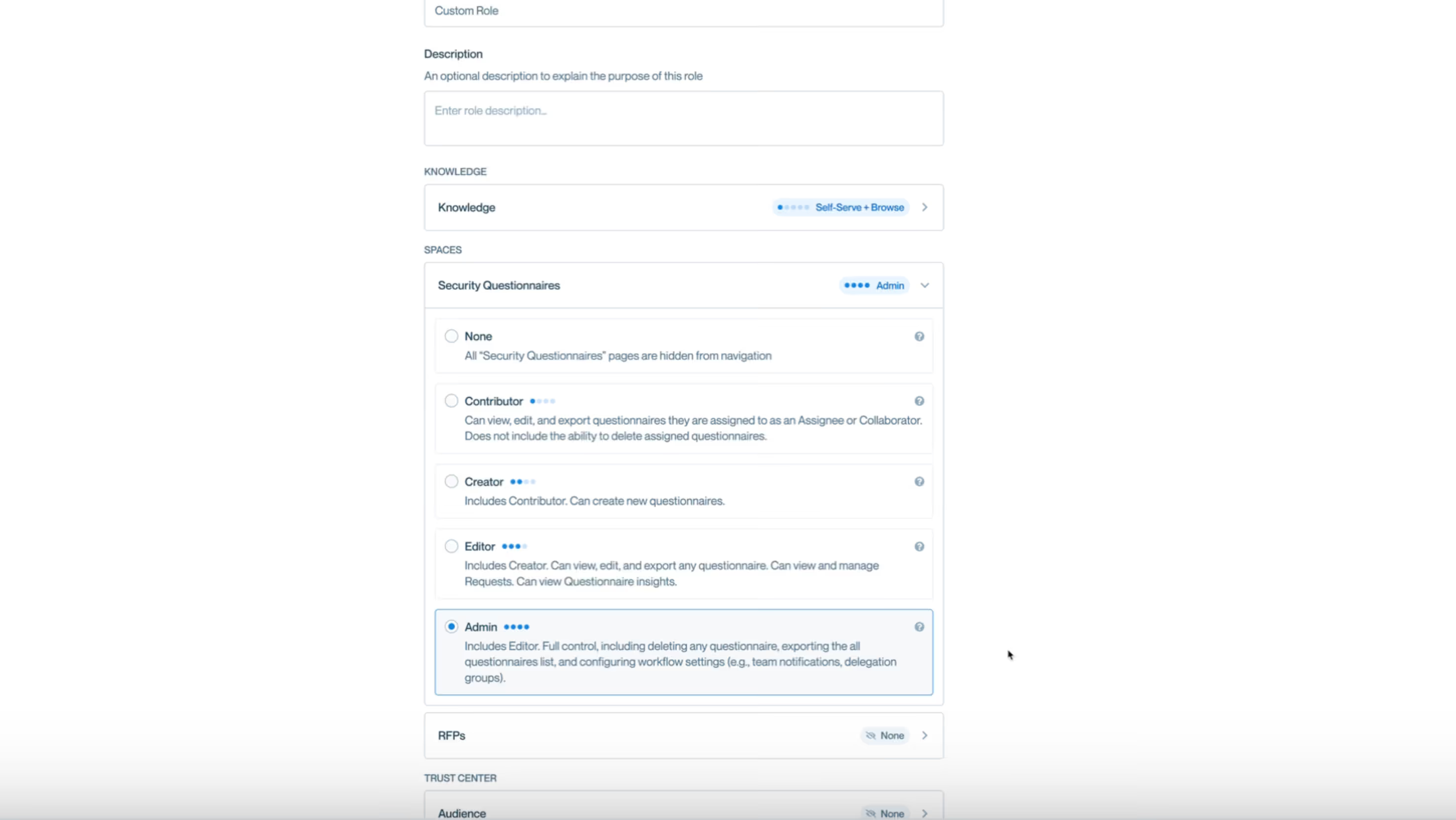
If you really want to solve customer trust at scale, you roll Conveyor out to your sales team. They process security questions and questionnaires themselves, without waiting on the security team. Great idea. Terrifying in practice, at least without the ability to control what they can and can't do.
Enterprise Roles and Permissions solves this.
Superadmins can now create custom roles with specific permissions and assign them to team members. Control who can edit Knowledge, who can manage settings, and who just needs to view and respond. All users also get a refreshed Launchpad and cleaner Settings layout.
This is a big unlock for teams ready to scale Conveyor beyond the security org. Want to roll it out to sales so they can self-serve? We'd love to share some best practices.
Navigate to Settings > Members & Access > Roles and click "Add Role" to get started.
Learn more: Inviting and Managing Your Team
Conveyor Labs
MCP Server: Connect your AI tools and agents directly to Conveyor
Last month we previewed the Conveyor MCP server. Now it's live in Conveyor Labs.
Connect Claude, Cursor, or any MCP-compatible client directly to Conveyor and your AI tools and agents can do a lot more than answer security questions.
Approve pending access requests to your Trust Center, track which customers are most engaged with your Trust Center, audit your Knowledge Base for stale content, check questionnaire completion rates, see which documents customers are downloading most. You can do all of this from a single prompt inside the tools you already use. You can even have your analytics agent use Conveyor data for your weekly/monthly reports to leadership.
We're also building a Claude Code plugin so sales teams can self-serve questionnaires directly in Claude, powered by your Conveyor knowledge base. Interested in testing or building skills? We'd love to chat.
Get started: MCP Server Setup Guide
Questionnaire Automation
Return completed questionnaires directly to your ticketing system
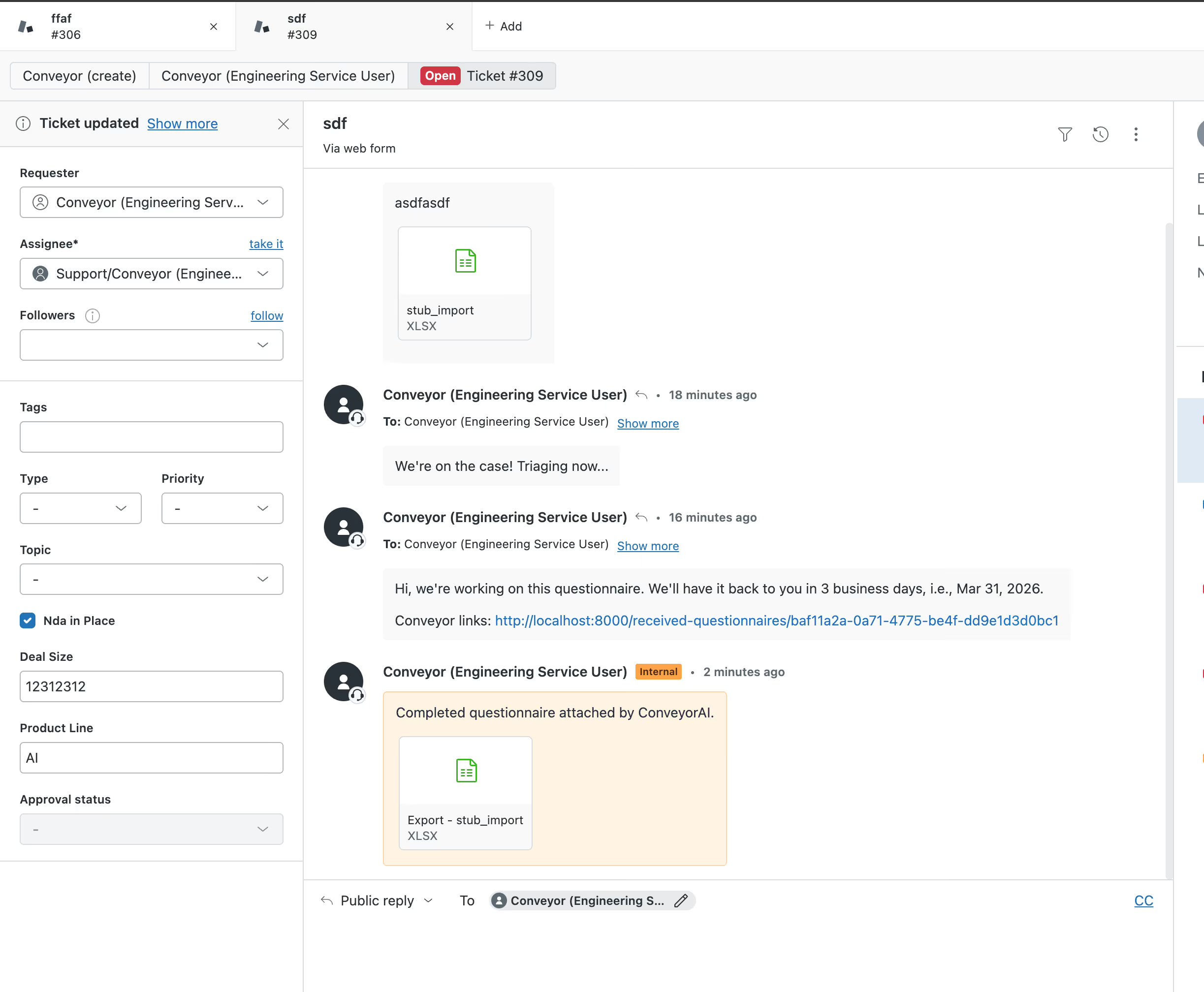
Most security review workflows start in a ticketing system. A case comes in through Salesforce, a ticket lands in Jira, a request pops up in Slack.
Conveyor's intake agent already pulls questionnaires in automatically. But once the questionnaire was done, you still had to download it and upload it back to the ticket yourself.
That gap is gone. Completed questionnaires can now be returned directly to the ticketing system they came from, including Salesforce, Jira, Slack, and Zendesk. Click "Send to Salesforce" (or Jira, Slack, etc.) and the file attaches to the originating ticket. No download, no re-upload.
No setup required. The new export button appears automatically for customers using the intake agent.
Learn more: Exporting a Questionnaire
Multi-column questionnaire support and a redesigned mapping experience
Spreadsheet questionnaires come in all shapes. The Yes/No/N/A checkbox columns format is one of the most common in enterprise security reviews, and until now it required manual reformatting before upload.
Conveyor now auto-detects multi-column, multiple choice formats when you upload a spreadsheet. And when auto-mapping needs a correction, a new step-by-step sidebar walks you through it in a few clicks. Select the question cell, choose the answer type, pick answer cells, and apply. One pattern covers the whole sheet.
This works out of the box. Upload any spreadsheet questionnaire and multi-column detection kicks in.
Learn more: Importing from Spreadsheets
Consistent confidence indicators across Slack, API, and in-app search
Answer confidence levels in Slack and the API now work the same way as in the questionnaire module. Exact matches show a green dot for high confidence, flagged answers show a warning for low confidence. Flags and exact matches also now appear in in-app search and the browser extension. Live for all customers, no changes needed.
Trust Center & Knowledge Management
Test your curated Q&As before they go live
Curated Q&As now support the same test environment controls that documents already have. Knowledge Admins can control whether a Q&A is available in live questionnaires, test questionnaires, or both.
Previously, any curated Q&A you added was immediately used by ConveyorAI across all questionnaires with no way to validate first. Now you can add Q&As in test mode, run them through test questionnaires, and promote to live once you're confident. Test Q&As apply to One-Off and Questionnaires in test mode only. Slack and Trust Center Agent interactions aren't affected.
Navigate to Knowledge Base, then Q&A. Click into any question and look for the new "ConveyorAI Environments" section in Settings.
Learn more: Curated Q&A documentation
Customize Trust Center Agent text directly in settings
Admins can now customize Trust Center Agent text configurations directly in the Agent settings page. No Active Admin access required. Update your disclaimer text, file disclaimer, and questionnaire fallback messaging whenever your needs change.
Head to Trust Center Agent settings and look for the text customization options.
Learn more: Enabling the Trust Center Agent
Disable Watermark per Document
New "Disable watermarking for this document" checkbox in the Trust Center Audience panel (second option under Additional Options) only for PDFs.
---
As always, check out the full changelog at conveyor.com/changelog for the complete list of updates.
.png)