
You have a highly capable engineering team. You have Claude Code, access to modern orchestration frameworks like LangChain, and performant vector databases. So when your CISO circles customer security reviews — and the painful questionnaire response process that comes with it — as something your company should automate, you say "heck yes, we can build this."
And here's the truth: you probably can. A capable team can have a working MVP — a script that ingests your SOC 2 report, embeds it, and answers questions against it — in a day. It's a great way to understand the architecture required for natural language retrieval, and it'll give your team a much sharper lens on what to look for in a vendor.
But there's a wide gap between "useful internal tool" and "enterprise-grade Customer Trust Platform." We've seen this pattern play out again and again. Highly technical companies like Zapier, Carta, and others started by trying to automate this internally. Eventually, they moved to a specialized platform like Conveyor.
The best teams aren't doing one or the other. They are combining the power of their favorite AI tools with Conveyor — read more about what's possible here.
They love their MVP, then it breaks, sales gets upset, customers are frustrated, and the juice isn't worth the squeeze. Building a system that eliminates hallucinations, manages knowledge decay, integrates with your CRM pipeline, and gives sales and customers a polished self-serve experience, while keeping all of it accurate and maintained? That's a massive commitment even for what seems like a simple workflow.
If you're determined to build your own, here's the architectural blueprint of what you'd need, along with the maintenance realities you'll run into along the way.
If you'd rather just jump into Claude and get going, read this post with Claude →
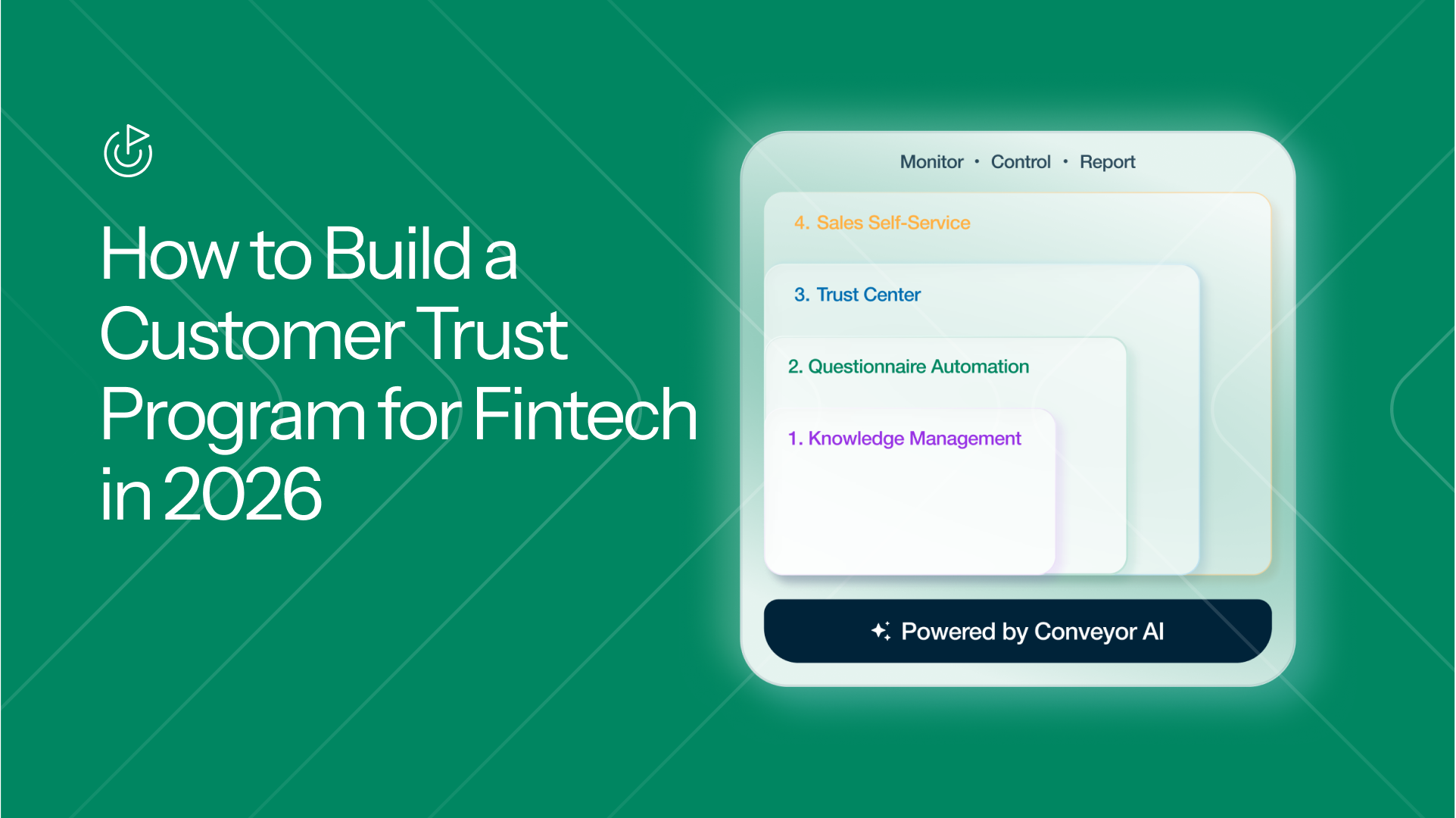
1. Knowledge Management: The Single Source of Truth
How to build it yourself
Before Claude can answer anything, it needs your facts. Here's what a solid knowledge ingestion pipeline looks like:
Document ingestion. Use a framework like Unstructured or LlamaIndex to parse your SOC 2 reports, pen test summaries, security policies, and historical questionnaires. These tools handle the messy parts (extracting clean text from PDFs, Word docs, and spreadsheets) so you don't have to write custom parsers for each format.
Source syncing. Set up scheduled jobs (CRON, Airflow, or a simple Lambda function) to pull the latest content from wherever your team stores it: Confluence, Notion, Google Drive, SharePoint. For each source, you'll want to track a last-synced timestamp and a content hash so you can detect when documents actually change.
Metadata tagging. Tag every ingested document with its source, last-updated date, document type (policy, questionnaire, audit report), and an owner. This metadata becomes critical later when you need to resolve conflicting answers or trace where a response came from.
Versioning. Store previous versions of each document so you can diff changes over time. When your SOC 2 Type II gets updated, you'll want to know exactly what changed and make sure the old language doesn't persist in your vector store.
The maintenance reality
This is where the MVP starts to strain. Data decay starts immediately. Your SOC 2 report says one thing, but an outdated Confluence page says another. Without a system to detect and resolve those conflicts, your "single source of truth" quietly becomes a source of contradictions, and your AI starts giving different answers to the same question depending on which chunk it retrieves.
A weekend project can ingest a few documents. Keeping dozens of sources synced, versioned, deduplicated, and conflict-free across a living security program? That's an ongoing engineering commitment.
How Conveyor handles this
Conveyor's Knowledge Library connects natively to Google Drive, Confluence, Notion, and public web pages, pulling content into a unified knowledge library rather than a flat document store. Each source is continuously synced, versioned, and deduplicated. It also handles knowledge so that it's filterable by all the different product lines and their nuances.
The key architectural difference: we treat knowledge as a self-healing system, not a static index. Our AI Librarian runs asynchronously across your entire knowledge graph to detect conflicting or duplicate information. If your SOC 2 narrative and an internal wiki page describe your encryption policy differently, the Librarian flags the conflict and recommends a resolution before it ever reaches a customer response. Explorer, another built-in tool, surfaces blind spots, showing your team exactly which topic areas lack supporting documentation so you can fill gaps proactively rather than discovering them mid-questionnaire.
2. The RAG Engine: Retrieving Approved Answers
How to build it yourself
To keep Claude grounded in your actual security posture (and not generating plausible-sounding fiction), you'll need Retrieval-Augmented Generation. Here's the architecture:
Chunking strategy. Split your documents into overlapping segments of roughly 256–512 tokens. Use semantic boundaries (section headers, paragraph breaks) rather than fixed character counts. Libraries like LangChain and LlamaIndex both support this. Overlapping chunks by 10–20% helps ensure you don't lose context at chunk boundaries.
Embedding and storage. Generate vector embeddings for each chunk using a model like text-embedding-3-large from OpenAI or Cohere's embed-v3. Store them in a vector database: Pinecone, Weaviate, Qdrant, and pgvector (if you prefer Postgres) are all solid options. Include the metadata you tagged in step one alongside each vector.
Retrieval. When a question comes in, embed the question, run a cosine similarity search against your vectors, and pull the top-K most relevant chunks (start with K=5 and tune from there). For better precision, layer in a re-ranker like Cohere Rerank or a cross-encoder model to score the initial results before passing them to Claude.
Prompt construction. Inject the retrieved chunks into Claude's context window with a strict system prompt: "Answer only using the provided context. If the context doesn't contain enough information to answer, say so." Include the source metadata so answers can be traced back to specific documents.
Evaluation. Build a test suite of 50–100 question-answer pairs from past questionnaires where you know the correct response. Run your pipeline against this set regularly and measure retrieval recall, answer accuracy, and hallucination rate. Tools like Ragas or DeepEval can help automate this.
The maintenance reality
RAG is straightforward to prototype but notoriously hard to perfect for InfoSec content. Off-the-shelf LLMs with basic RAG tend to hallucinate on roughly 3% of answers. On an 80-question security review, that's 2–3 fabricated answers. In security, a fabricated answer isn't just wrong. It's a contractual liability.
You'll also find that chunking strategies that work for one document type fail on another. A policy document chunks differently than a spreadsheet-based questionnaire. Tuning this is an ongoing project, not a one-time setup.
How Conveyor handles this
ConveyorAI is purpose-built for high accuracy on InfoSec content, the domain where generic RAG struggles most. The architecture goes beyond single-pass retrieval: multi-hop retrieval decomposes complex security questions into sub-queries, retrieves evidence for each, and cross-references results against the knowledge graph before generating a response. Source-consistency guardrails reject answers where retrieved chunks conflict, forcing the system to reconcile or escalate rather than guess.
The result: our measured hallucination rate on security questionnaires is well under 1%, compared to the ~3% you'd expect from a standard RAG implementation. Every generated answer is tagged with a traffic-light confidence score (Green for exact source matches, Blue for high confidence, Yellow for human review) along with paragraph-level citations back to the specific document and section the answer was derived from. Your security team doesn't have to trust the AI. They can verify the evidence in seconds. For a deeper look at how the AI works, see our ConveyorAI documentation.
3. An Agent for Security Questionnaires
How to build it yourself
Your security team needs a way to actually use this, not just an API endpoint. Here's what a functional questionnaire automation tool requires:
File ingestion. A year ago, this section would have walked you through openpyxl for Excel, python-docx for Word, and pdfplumber or PyMuPDF for PDFs — plus custom heuristics for each format. That part is largely solved now. You can hand Claude the raw file in whatever format it arrived in (Excel, Word, PDF) and it will read the document natively. No parser layer to build, no per-format code to maintain. The format-specific complexity has moved up the stack.
Question extraction. Claude can also do most of the extraction work in the same pass — hand it a multi-tab spreadsheet or a nested Word doc and ask it to return a structured list of questions, and it will usually do a reasonable job even with merged cells, sub-questions, and paragraph-buried prompts. The remaining work is about reliability at scale: prompting consistently across hundreds of formats, validating that you didn't miss questions, ignoring instructional rows that look like questions, and handling the long tail of edge cases that show up when you process real customer questionnaires every day.
Writing answers back into the original file. This is where the work has actually moved. Customers expect their questionnaire returned in the exact spreadsheet they sent — same tabs, same merged cells, same formatting, response in the right column next to the right question. Extracting questions with Claude is easy; reliably writing answers back into the source document without breaking its structure is still custom engineering, and it's the part that breaks most often in real-world use.
Batch processing. Loop through extracted questions, send each one to your RAG pipeline, collect the answers, and write them back to the original format. For a good user experience, run these in parallel and stream progress updates to your frontend.
Review UI. Build a web interface (React, Next.js, or whatever your team prefers) where the security analyst can see each question alongside the AI-generated answer, edit responses, flag items for subject-matter expert review, and export the final document. Without this, your team will be copying and pasting from a terminal.
The maintenance reality
Questionnaires rarely arrive as clean CSVs. They come in deeply nested Word documents, heavily formatted PDFs, and third-party web portals. Claude handles the raw parsing well, but extraction quality still varies — a merged cell here, an unexpected sub-section there, a portal with a JavaScript-rendered form that doesn't expose its questions cleanly. Someone on your team owns chasing down the edge cases and keeping the round-trip (extract → answer → write back) intact as formats evolve.
Beyond parsing, your security team needs collaboration features: the ability to assign questions to specific reviewers, leave comments, track which questions are done, and manage multiple questionnaires in flight at once. That's a significant frontend engineering effort on top of the AI pipeline.
How Conveyor handles this
Conveyor's Questionnaire Automation handles the full round-trip so your team doesn't have to. We natively ingest Excel, Word, and PDF formats, including the nested, merged-cell, multi-tab spreadsheets that break custom pipelines — and we write answers back into the original document with its structure and formatting intact.
For portal-based questionnaires, ConveyorAI automatically connects to the portal, understands the HTML of third-party platforms like OneTrust, Whistic, and ServiceNow, extracts the questions, runs them through ConveyorAI, and fills the responses back into the portal fields. No copy-pasting, no re-typing. See the full list of supported portals.
The review workflow is built for collaboration: analysts can edit responses inline, flag questions for subject-matter expert review, adjust verbosity, and track progress across multiple in-flight questionnaires, all within a single interface rather than a spreadsheet passed around on Slack.
When Carta moved to Conveyor, the impact was immediate. They ran a 77-question spreadsheet through the platform, and it answered 72 correctly. What used to take days of manual work took 20 minutes. Overall, Carta saw an 83% decrease in time spent on customer security reviews and 95% AI accuracy out of the gate.
4. The Trust Center: Customer Self-Service
How to build it yourself
Answering questionnaires is reactive. A Trust Center is proactive. It lets buyers find answers on their own before they even send a questionnaire.
Frontend portal. Build a public-facing site mapped to a custom domain (e.g., trust.yourco.com). Host your compliance certifications, security documentation, and FAQ content here. Frameworks like Next.js or Astro work well for this. You'll want it to look polished, because this is often a buyer's first impression of your security posture.
Gated access. For sensitive documents like pen test reports, build an authentication layer. At minimum, you need email-based access requests and an approval workflow. For higher security, add an NDA click-through using an e-signature service like DocuSign or Dropbox Sign's API.
CRM integration. Connect to Salesforce or HubSpot so you can auto-approve access for prospects who are already in your sales pipeline. This means building an OAuth integration, writing logic to match email domains to CRM records, and handling edge cases (like when a prospect uses a personal email).
Alerting. When someone requests access, who gets notified? Build a Slack or email notification pipeline so the right person on your team can approve or deny requests without logging into a separate admin panel.
The maintenance reality
You're now managing bespoke identity and access management, NDA workflows, CRM syncs, and approval routing. Each of these is a small project on its own, and each one breaks independently. When HubSpot changes their API, or DocuSign updates their webhook format, someone has to fix it.
How Conveyor handles this
Conveyor's Trust Center gives you a production-ready portal without building any of this infrastructure yourself. It handles the identity layer (NDA click-wraps, document watermarking, tiered access levels for public vs. approved-only vs. internal content) and plugs directly into your CRM. Our Salesforce integration auto-approves access when a visitor matches an active opportunity in your pipeline. No custom OAuth flows or domain-matching logic required.
The biggest difference: Conveyor embeds a conversational Trust Center Agent directly in the portal. This agent is backed by the same retrieval pipeline and confidence-scoring system that powers Questionnaire Automation. Buyers don't have to dig through a 40-page PDF to find out if you encrypt data at rest. They ask the agent, get an instant answer with a source citation, and move on. Self-service security that works for buyers and scales without adding headcount on your side. See the Trust Center quickstart for setup details.
5. Self-Service for Sales
How to build it yourself
To truly eliminate the security bottleneck, Sales needs to use this tool, not just Security. Here's what that requires:
Access controls. Give your AEs access to the RAG-powered chatbot, but with guardrails. Build a role system that controls what Sales can see and do. At minimum: Sales should be able to ask questions and view high-confidence answers, but shouldn't be able to modify the knowledge base or send unreviewed answers directly to customers.
Slack integration. Your AEs live in Slack. Build a Slack bot (using Slack's Bolt framework) that lets them ask security questions inline. The bot should return the answer along with a confidence indicator and a source citation so the AE can judge whether to use it or escalate to Security.
Invite workflow. Build a flow where an AE can invite a prospect directly to the Trust Center (pre-authenticated, with the right access level) without involving the security team.
Audit trail. Log every question Sales asks and every answer the AI returns. Your CISO will want to know what's going out the door, and you'll want this data to improve accuracy over time.
The maintenance reality
Here's the nightmare scenario: an AE takes a hallucinated answer from your internal bot and pastes it into an enterprise contract. Without enforced review policies and confidence-based visibility controls, there's no safety net. And if the tool is hard to use, Sales won't use it at all. They'll go back to pinging Security on Slack, and your months of engineering work sit unused.
How Conveyor handles this
AEs interact with Conveyor through the channels they already use: a Slack bot for quick answers, a direct invite flow to send prospects to the Trust Center, or through your CRM workflow via our Salesforce integration. The confidence-scoring system (Green / Blue / Yellow) acts as an automated policy layer. You configure rules like "Sales can view Green and Blue answers; Yellow answers route to Security for review," and the platform enforces them without relying on individual judgment calls.
Every query and response is logged with full attribution: who asked, what the AI returned, what source it cited, and whether it was edited before being shared. Your CISO gets a complete audit trail without anyone wiring up custom logging infrastructure.
Zapier's team is a strong example of this in practice. By centralizing 434 knowledge base items and 2,675 past answers into Conveyor's Knowledge Library, and letting Solutions Architects route requests through the AI agent instead of the GRC team, they went from manually working 90% of security questions to just 20%. They now spend 75% less time on security questions while processing 3x the volume, all without adding headcount.
6. Monitoring, Measurement, and Access Controls
How to build it yourself
Once the system is live, you need visibility into what's happening and control over who can access what.
Analytics dashboard. Wire up a dashboard (Grafana, Metabase, or a custom React app) that shows your CISO how many questionnaires were processed, average response time, accuracy rates, and which documents are accessed most. Pull this data from application logs, your vector DB query history, and your review UI's completion records.
ROI reporting. To keep this project funded, you'll need to quantify time saved. Track the before-and-after: how long questionnaires took manually vs. with your tool, how many reviews your team handles per month, and how that's changed since launch. Build a simple report that leadership can actually read.
The maintenance reality
Enterprise-grade RBAC is a deceptively large project, especially at scale with multiple product lines, customer segments, and access tiers. And showing ROI to leadership is difficult when your metrics are scattered across application logs, Grafana panels, and spreadsheets.
How Conveyor handles this
Roles, permissions, and product-line filtering are built into the platform. You can scope document visibility by product line, restrict which team members can create or publish questionnaire responses, and control what Trust Center visitors see based on tiered access levels (public, approved customers, or internal only).
On the analytics side, Conveyor's dashboard tracks the metrics your CISO actually cares about: questionnaires processed, average response time, AI accuracy rates, which documents buyers engage with most, and total time saved. One dashboard your team can share with leadership, instead of stitching together data from Grafana, application logs, and spreadsheets. See what our customers have achieved with the platform.
7. The Economics: Build vs. Buy
Let's talk numbers, because this decision ultimately comes down to what makes sense for your business.
Buying Conveyor: ~$50–100K/year
That gets you the full platform: self-healing knowledge base, RAG-based AI engine, Trust Center with CRM-based access and an integrated agent, questionnaire automation (inc. third-party portals), Slack bot, sales triage features, MCP server, open API, and continuous updates with human support.
Customers like Zapier and Carta are seeing 3x capacity increases and 75%+ time savings within weeks of onboarding, with zero engineering investment.
Building in-house: ~$500K–$1M+/year
Here's what that looks like:
- Engineering headcount. You'll need 2–3 dedicated engineers to build and maintain this. At $150K/year each (fully loaded — likely more), that's $300–450K before they've written a line of code.
- Infrastructure costs. LLM API calls, vector database hosting, compute for embedding pipelines, and a frontend hosting stack. Budget $50–100K/year, and that scales with usage.
- Knowledge base curation. Without an AI Librarian, someone on your team is manually keeping sources synced, resolving conflicts, and filling coverage gaps. That's ongoing time from your security team, not your engineering team.
- Everything else. Trust center design and hosting, CRM integration maintenance, RAG pipeline tuning, accuracy monitoring, hallucination reduction, browser extension development, sales workflow integration, and triage logic. Each of these is a small project that needs ongoing attention.
That adds up to roughly 10x the cost of buying, and you still end up with a narrower, less battle-tested product.
The long view
To be fair: if you're a large engineering org with a truly unique security workflow, there's a case for owning the toolchain long-term. In-house systems can be customized infinitely, and over a multi-year horizon, the per-unit economics can improve as you amortize the initial investment. That's a real argument.
But it only works if you're willing to treat this as an ongoing product, with dedicated engineers, a roadmap, and the same rigor you'd give a customer-facing feature. Most teams aren't signing up for that. They need the problem solved now, not in 18 months, and they need their engineers focused on the product they actually sell.
The real question
It's not "can we build this?" Your team almost certainly can. It's "is this the best use of $500K+ and 2–3 engineers for the next year?" For most companies, the answer is no. Not when you can get a production-ready platform, proven at scale, for a fraction of the cost, and redirect that engineering talent toward your core product.
The Verdict
If you've read this far, you know what it takes. The architectural blueprint above is real. Your team can build a working version of this. A solid MVP is weeks away, not months.
But the gap between "working MVP" and "enterprise-grade platform your sales team actually uses, your buyers actually trust, and your CISO can sleep at night knowing it won't hallucinate in a customer contract" is where the real investment lives. It's 2–3 engineers, $500K+/year, and an indefinite maintenance commitment.
We'd rather you put those engineers on your core product. Share this post with your engineering team. Have them look at the architecture, kick the tires on the build. And if you'd rather skip straight to results, book a demo and see what Conveyor can do for you today.
.png)

-p-1600.avif)